[UPDATE 💡] I moved to Mountain View, California in December 2024, concluding my chapter in Tokyo!
Also, I joined Google Labs to make a new AI product for Google on July 2025, leaving Gemini App team.
Hi, I'm Jiho. I am a product developer and researcher, building products with machine learning and natural language processing (NLP).
I like to write about machine learning, NLP, AI and product development. I also write in Korean.
Currently, I am working on a new AI product that aims to innovate how people work.
I've been at Google since 2020, starting from Japan, working on these products:
Maybe this post is for those executives/managers who think their dev teams can all be laid off and replaced by LLM coding agents.
I heard a story from my software engineer working in finance that his stakeholder came back with some vibe coded results from ChatGPT and asked him why his team cannot fulfil his request faster. In my friend’s mind, several reasons came up - integrating to existing prod code, some weird tech debt, headcount issue, etc. - but he did not say much, because it would all just sound like an excuse to the stakeholder and make him sound incompetent. Those reasons are hard to explain to a non-technical person without enough context.
Like this anecdote, vibe coding makes our jobs look so easily replaceable. Compelling quotes from people like Jensen Huang (who has a serious stake in hyping up the idea of replacing dev team jobs with his GPUs) appear on famous business news and magazines.
What should we do? Students or juniors—should you stop pursuing this path? Seniors—should you treat this as a mid-life crisis and start looking for other occupations? I mean, how can we possibly be better than Devin, our software engineer AI?
Let me say this—not all software engineers will be replaced! (But, as always, I may be wrong, so don’t depend on my word for your career decisions).
Coding vs. Programming
There is a lot of confusion between these two words, especially among non-technical people. In order to contemplate our existential crisis, we need to clearly define these terms.
Programming is fundamentally about getting computers to work on tasks for us. These tasks are something that we do not want to do, because they are tedious, time-consuming, or too complex to do. We can also think of this as “automation”.
Coding is about giving computers instructions for these tasks. It is a way of communication. We started from punching holes in cards. Often, we need programming languages like C++ and Python, which closely resemble our common language English and mathematical expressions. Nowadays, there are also “no-code” platforms, which make it easier to instruct the computer via UI. While these are not written format, they still can be considered as “coding” as they should have some syntax to make things work (think of Scratch, the UI-based programming language, or Zapier, or recently n8n workflows).
Programming is larger than coding. A child can learn how to write the alphabet, but it is not sufficient to write a sentence. Writing a sentence is a good start, but not sufficient to write a book, let alone an essay.
Programming involves all processes that go into developing software—problem definition, planning, ideation, design, testing, and many more. Coding is just one small part.
Programming vs. Software engineering
Let’s look at even a bigger picture. Software engineering is not just about programming. Software engineers don’t build real, physical things, such as bridges or tunnels like civil engineers, but we are still called “engineers”. Why?
Because we do not just “code” to automate tasks, but we build “programs” that perform tasks not thousands, probably millions, maybe trillions of times. Such repetition needs to be reliable, lasting for a pretty long time, serving many customers. We also need to build new features. This often requires structural changes to the program, which incur constant refactoring and migrations. Doing this while maintaining stability is like changing train components while the train is running at 300 km/h!
Even before that, we need to figure out what to build. People may think that this is the role of product managers, designers, or business developers, but without the input of software engineers, such proposals can be disastrous from the beginning. Some companies do not even have other functions, so engineers need to wear those hats ourselves.
Last but not least, software engineering is mostly a team sport. Unless you are an individual, independent developer, you most likely work with a team of other software engineers and non-tech functions. This involves “social” and “management” aspects, which many of us dread, but it is necessary to get big things done. Code reviews, bug tracking, project management tools, etc. exist for this reason.
Can we be replaced by LLMs?
Now that we have defined these three terms, we can go back to the question: “Can software engineers be replaced by LLMs?”
Well, it depends.
While it is debatable whether LLMs have or will bring enough value in all industries, one thing for sure is that they have fueled the productivity of software engineers.
They can do coding pretty well with amazing speed. Apparently, a lot of our work involves “boilerplate” tasks, which were tedious and time-consuming. LLMs excel at these.
As I mentioned in my previous post, they have almost replaced Stack Overflow and a lot of API documentation reading. For example, I use the Python libraries Pandas and Matplotlib a lot, which I find the APIs not too intuitive sometimes, but using Gemini really boosted my productivity.
With some good principles as I discussed, LLM coding tools will make software engineers productive.
Being productive is one thing, but do LLMs always make the right decisions?
Context, context, context for decisions.
When Claude and Gemini came up with millions of tokens of context window, a lot of people thought: “Now, I can attend to the whole codebase, so I have all the context!”
Yes, but not enough yet. Apparently, not all contexts are documented. Some might be from a meeting that happened 2 years ago, or an office corridor chat that happened 3 minutes ago. In reality, codebases are really messy and documentation is almost never complete. Some contexts are not always accessible to LLMs.
Humans live in context—we didn’t fall from the sky. The more senior you are, the more context you need to absorb. That’s why they attend so many meetings, conferences, etc. A competent, long-tenured engineer leaving your team is going to hurt the team, because they exit with all that context.
So yes, the so-called “long” context of LLMs is not long enough to replace your engineer, who makes decisions on what and how to build things.
Conclusion
So, can LLM coding agents replace software engineers? The answer is not straightforward. LLMs have become powerful productivity tools that handle boilerplate, answer API questions, and speed up development. But software engineering encompasses far more than coding: it requires understanding undocumented context, making architectural decisions, navigating technical debt, collaborating across teams, and balancing competing priorities in real-world systems.
The stakeholder in my friend’s story saw working code from ChatGPT and wondered why the team couldn’t deliver faster. What they didn’t see was the invisible work—the context, the trade-offs, the maintenance burden, the human judgment.
Again, who knows how far LLMs will advance in 2026! Let’s just hope we can keep growing ourselves so we won’t be replaced by AI any time soon.
Launching a product is exciting, until the server goes down after 3 hours. Users were complaining on Twitter and Discord that they cannot get in.
I joined Google Labs this July and was fortunate enough to get a chance to experience a product launch only after 3 months! Let me share what happened and some thoughts.
What is Pomelli
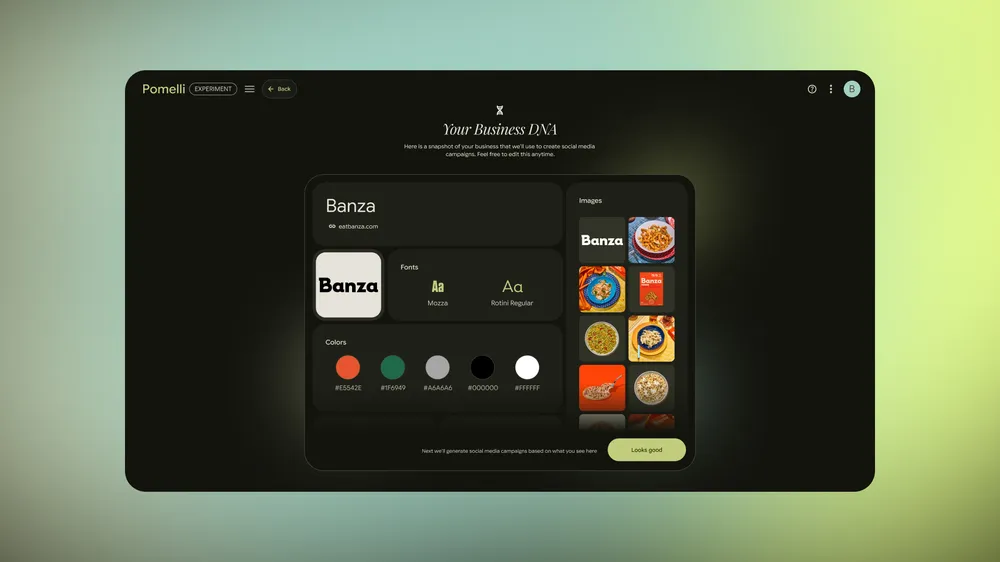
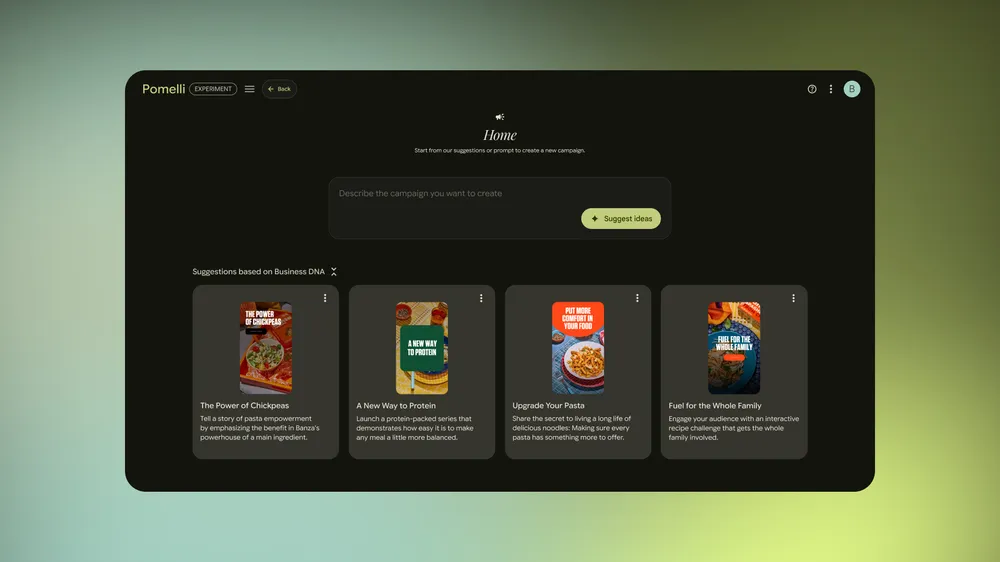
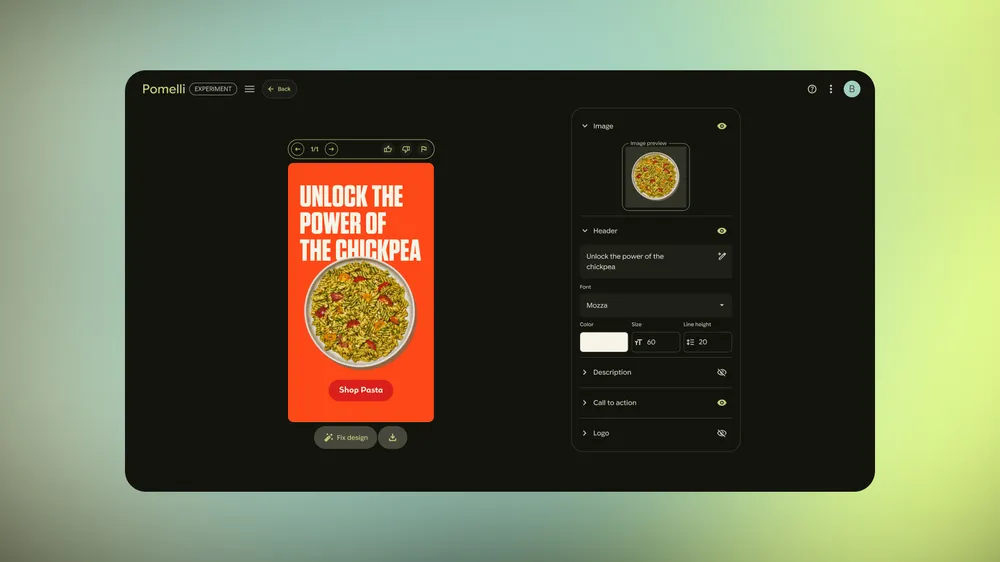
Pomelli is an AI marketing tool for small and medium sized businesses. It understands each business and brand and helps one to easily create marketing campaigns and creatives, tailed to each business. Read more in the Google Keyword Blog.
Generate the business DNA
Create your marketing campaigns
Generate in-brand creatives.
This was a beta launch, now only available in USA, Canada, Australia, and New Zealand. Hopefully, we can launch in more countries next year!
Launch Day
The morning we launch, the team was thrilled. We had a live dashboard to see real traffic coming in. It was supposed to be a relatively a silent launch, but we got a lot of attention in X (Twitter) and other channels.
But then the things were not working after 3 hours. Our servers were not responding properly. Users started complaining that they cannot go to the next stage of the product.
Apparently, things were melting on the component that I worked on. We had to analyze what’s going on and figured some part of the code was problematic. I had to do an emergency bug fix to cut that part of the code out, without too much sacrifice of the original feature.
I deployed the code, hoping that things would work again. However, it didn’t. By this time, users were blocked for several hours. We were even considering to put the curtains down, saying that we will be back later.
But then my amazing colleague detected another, potentially relevant, issue in the server. He started working on a fix. Things came back to normal. We announced to the users that we experienced a distruption due to unexpected amount of traffic, but we fixed the issue.
It was almost midnight when things concluded. We could all go to bed that day.
Takeaways
Good problem to have
Our PM director, Jaclyn, wrote in her blog, reflecting the launch.
She called this the Sucess Disaster. Because we were successful to get attention and traffic, problems revealed.
“This is the kind of problem you want to have. The reason things went wrong was because something went incredibly right.”
This view blew me away, not only because it is such a positive perspective, but also because it is such an accurate take. We would have never caught this issue with only hundreds of users, but only by having thousands or even more users using the product.
In the end, we are having unbelieveable amounts of users coming in and trying out our product!
Early Experiment
The philosophy of Google Labs is to launch early and validate fast. In a huge company like Google, it may be hard to have this kind of mentality and environment. Google Labs is literally a product labatory to avoid falling into such trap.
Just go take a look at labs.google and see what we are doing. There are many things that are hard to imagine a large company like Google would work on.
After launching Pomelli, I am now starting to understand and experience what this philosophy actually means.
The bigger picture
That does not mean that we are aiming for small things. We are launching fast, but these are just seeds of something that is potentially much bigger.
For example, Pomelli is not just another content generation tool, but it may become an ultimate AI operating platform for small and medium sized businesses, which Google has traditionally not been great at. Forbes already analyzed the potential of our product!
For this reason, we need to think big and look multiple steps ahead, but need to start somewhere.
–
This launch is one of the highlights of my whole programming career. I’m very happy that I decided to join this org and team and launch something with the team so fast.
We will continue to launch more features into Pomelli.
I am learning and experiencing a lot of interesting product and engineering problems, so I’m looking to write more on those things.
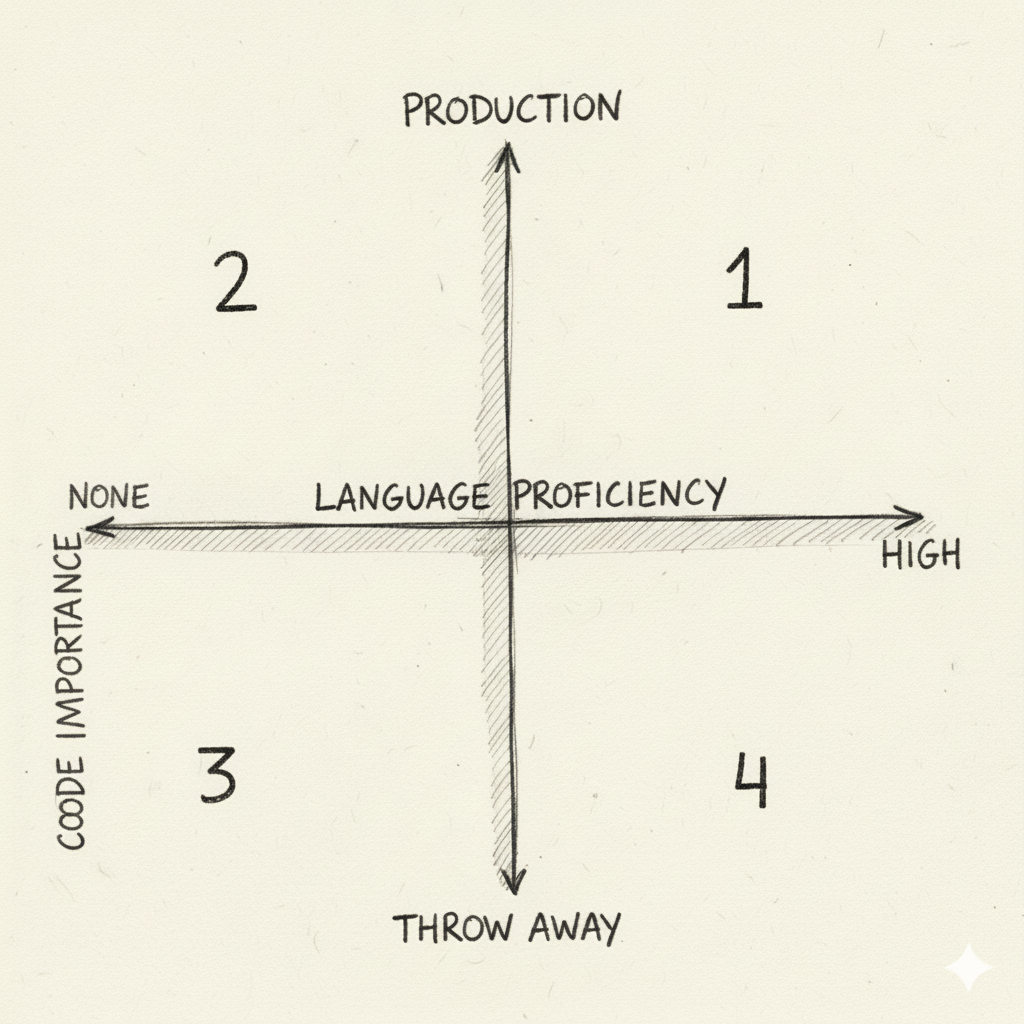
Quardrant 1 - High Impact Zone.
Quardrant 2 - High Danger Zone.
Quardrant 3 - Full Fun Vibe Coding Zone.
Quardrant 4 - “Parents at the party” Vibe Coding Zone.
Potentially I can make the most impact with LLM, but also I need to be most cautious. Don’t forget the code here is going to be run on production, so I need to be rigorous. I need to think about basic unit and integration testing.
Being productive here can lead to being good at my main job. Be thoughtful.
I would not operate here too frequently, unless I have a patient colleague who can help me review the code. But don’t throw them a large chunk of garbage code without any understanding. This risks of making that person mad and lose trust on me.
I should try to get my proficency at least at medium level, to Quadrant 1 as close as possible.
This is where I have no idea what’s going on (flying blind), but get to have fun to see the outputs. At least, I need to make sure what you want as output (ex. UI, data visualization). I will probably waste a lot of time prompting, because I am not really understanding the code. Just ride the vibe.
Here is also quite productive, but not it’s not totally vibing. I call it the parents at the party, because I might still be parenting the code that’s been generated, which is not exactly vibe coding. It’s like being a parent who still want to enjoy the party vibe while discplining their children.
Intern
Treat AI coding tool as your intern, not an expert.
Sometimes, I need to micromanage. Be specific about which files and past changelists to read to do the task.
Give them tasks that are tedious, straightforward, and stupid, but and need to be done.
Break up the tasks into smaller chunks.
Don’t trust their codes. Read their code with suscipicious eyes. Read the rationale of their changes, too.
Accept that they will sometimes be stuck in a rabbit hole.
Accept that they will sometimes be brilliant than me and produce creative solutions.
Use Git effectively + small change lists.
Make sure to separate into small chunks of changelists and commit what you already reviewed and that’s good. This will help organize what’s going on and roll back if things go badly.
Also, Some IDEs will first show the proposed changes that I need to accept in bite pieces. Please use this feature.
Check your energy level
Sometimes, when things don’t work, I tend to get into a loop where I just keep generating and prompting the AI coding tool to fix the stupid error message I don’t understand. If it fails, I just regenerate or just reword the prompt slightly, and re-try.
LLMs get stuck in a rabbit hole, especially when I am stuck in the rabbit hole.
When my energy level is low, it’s like I want to do doom-scroll. Don’t doom LLM code. Take a break. Go get some tea, walk, exercise. Or just do it tomorrow.
And when your energy level is back, I try to actually read the code / error message myself without the AI coding tool. Sometimes, the answer is just right there.
Don’t tell your colleagues that you are using AI agents. Or do.
I still don’t know if I should be embarrassed or proud when my manager or colleagues sees my triple monitors having two AI agents to write code. Once my manager said, “that’s cool”. I don’t know if they meant it or started degrading my confidence in my code :P
Anyways, I own your code and the results from it. People wil care less and less about how I got there as long as it is good.
If I hire your own intern, I will be responsible for their outcome, but stakes may be low. In the LLM’s case, the intern’s work is coming out with your own name. Take pride in my work. Do you review. Don’t take transfer this responsibility soley to my code reviewers.
Final verdict
I am 100% sure that using LLM coding tools has become a crucial aspect for being a productive engineer. However, in order to do this, you first need to be a good, principled engineer, or you are going to produce sloppy work, which is a huge risk to not only your career but also your team’s product.
Google IO 2023 was one of the most memorable event, because our CEO Sundar presented a piece of code that I reviewed.
My code being presented at Google IO 2023.
PaLM, the state-of-the-art language model at that time, was featured to not only fix your bug, but also put code comments in Korean!
A side story for this 15 sec presentation is that I was pulled into a group chat of several Korean Googlers to come up with the best example of LLM fixing a bug. I added this DFS example, because this was something I frequently get wrong.
I was delighted that PaLM can fix this, but was even more happy when Sundar presented this code live to the world!
(I joked that this would probably the most influential code snippet that I would ever write or review in my Google career..)
Anyways, this is just over 2 years ago. If I think about how I use coding agents in 2025, the advancement is mind-blowingly fast. People say that software engineering as a career is in track for deprecation. If vibe coding can build softwares, then why do we need expensive engineers?
Before we get to that question, I want to share how I use AI coding tools. I know that there might be a lot of folks who use AI tools better than me, but I want to record my current experience for my own future entertainment.
Google’s Developer Ecosystem / Culture
Google definitely has a unique developer ecosystem and culture, so unique that a software engineer working for Google has a risk of being stuck in it.
But in terms of AI coding assistant, I would say outside world has moved much faster. Github Copilot, Cursor, Windsurf, Claude Code, and so many applications have came up over the last 1-2 years.
Since Google has a lot of software engineers, there is huge incentive to make our tools better. Also, we have Gemini, especially 2.5 showing huge improvements in coding capabilities.
By now, our internal AI coding tools have catched up a lot, and engineers adopted fast. We also have released them to the public, so I can introduce some workflows that I use frequently:
gemini-cli - a terminal based coding assistant. Similar to Claude Code.
Gemini Code Assist - we don’t use exactly this, but similar features are integrated to our internal IDE, Cider and code review tool, Critique.
Most Productive Workflows (I find)
1. Code Understanding
When I joined the new team in July, I had to onboard to a new codebase as soon as possible. But the challenge was that I have never written a Java backend nor Angular.js frontend code! Since I mostly worked on data, I was more familiar with C++ or Python.
Obviously, my team mates are the most helpful for onboarding, but I did not want to bother them for every details of the code. So I decided to leverage Gemini CLI.
“(Hey Gemini) Explain the workflow of this function. Draw a diagram.”
“Which file does this link to? How is it wired up this way?”
It is like having a mentor with unlimited patience and bandwidth right next to you!
I drew how some parts of the code worked on a whiteboard with the help of Gemini to get the whole picture and the details. This really boosted my onboarding. I even could give a presentation to my colleagues on what the status quo of some component is and suggest improvements.
2. Refactoring
Refactoring is often neglected, because it is tedious structural changes of the code - Moving function parameters around, breaking down functions, renaming things - while not breaking the compiler or the original feature.
Good news is that LLMs never get bored and is amazing at syntax. Also, it can go through the whole code or even codebase and make changes that are needed if I change one little thing. Tedious edits like imports, header files, etc.
A new feature development is some times blocked by refactoring. Now, small refactorings would not block me, because the time I spend on it reduced to 1/10.
3. Unit Test Generation
Important point to make your codebase easier to refactor is having good unit tests. Any basic unit test is significantly better than nothing.
However, some times unit tests are omitted due to the tedious syntax of mocking and test case writing. Again, hard-working LLMs are here to help!
Obviously, I do not ask it to write unit test without knowing what I want to cover, but it helps a lot when I don’t have different mocking library patterns on top of my head.
4. Writing new code
With LLMs, my way of thinking elevated to focus on the logic, rather than specific langauge’s syntax.
I have my basics on OOP and async operations in my head, but just not in Java, which I haven’t used in more than 15 years. It would have taken me 2-5x amount of time if I had to look through Java documentations to find the equivalent of something in C++.
Now I will prompt the LLM to implement the logic I want. Sometimes, I even express myself in Python with a simpler syntax and ask it to implement the same logic in Java.
Another good thing is that the coding assistant will take the whole file as a context, so it follows the team’s previous patterns and style, whenever reasonable.
I also find this super useful for frontend development. I recently picked up Angular.js, which sometimes involve modifying muliple files (javascript, css, html) at once. LLM is excellent for doing this.
5. Self-code review
Due to my personality, I tend to spend quite a lot of time to review my own code before sending it out to a colleague. Now, there is a feature to auto review a changelist. This has been great to reduce both my and the reviewer’s time, especially I am prone to make basic mistake on a language that I’m not familiar with.
6. Error Message Parsing
Error messages can be brutally long and cryptic, but I now ask LLM to explain them to me and even suggest a fix! This really is a game changer to reduce time debugging.
7. Readability Suggestion
Google has a particular culture of readability reviews. Pros of this culture is that the overall code quality is higher, with the cost of slowing down. Especially for new product development, velocity is super important, so I felt relunctant to put any readability related comment on the code.
However, now LLM can read my nitty comment and attach a fix with it. The author can select to apply the fix with one button press. This is really effective to keep the code quality high, while maintaining velocity!
8. AI Powered Colab
Colab (Jupyter notebook) is a powerful tool for quick data analysis or data pipeline prototyping. Most colabs do not need to be elegent or well-tested as production code.
This means that there is more room for “vibe” coding. Colab recently started adding AI coding assistant inside the UI!
9. Vibe Coding Prototypes
Most of the time, demoing is better than explaining in words. Vibe coding prototypes when brainstorming new ideas on a feature is really powerful for this reason.
I can imagine or already experienced how vibe coding can be so effective for non-technical roles like product managers, business devs, and UI/UX designers to build ideas without consuming engineering team’s resource.
Vibe coding is at the level to replace engineering teams, but I would not say too early given the pace of speed this space are developing.
I often use Gemini Canvas from Gemini App for this purpose, but there are about thousands of tools to vibe code something.
Closing
There has been studies that using AI tools actually make developers slower., but people are always talking about how crazy productive these AI coding tools are. Who is correct?
While I am not the most expert in this field, I can totally see that when not used properly these tools can slow you down. I also experienced some trial and errors.
There are some principles and tips I have on how to effectively use these tools, but that will be for my next post.
One of the books that deeply influenced me is Antifragile by Nassim Taleb.
Taleb talks a lot about optionality. My interpretation is that optionality in life means putting myself in situations where I have unlimited upside and limited downside.
Limiting my downside has been relatively easy: follow obvious rules like “Don’t put all your eggs in one basket,” “Avoid life-threatening activities,” and “Don’t take leveraged bets that can knock you out of the game.” In short, don’t bite off more than you can chew.
On the other hand, creating unlimited upside has been about thinking strategically and making hard choices. Whenever I feel like my upside has limits, I seek change.
For example, when I was a computer science undergrad, I got involved in many different startups. I learned many skills, but most importantly, I learned that merely being good at programming had a limit. Fortunately, my best friend, whom I met playing football, introduced me to a natural language processing (NLP) lab. I never liked university, but I decided to stay and do research as a master’s student. During these two years, I dove deep into machine learning, deep learning, and NLP. I took baby steps to learn about the field and do research, eventually publishing my work at NLP conferences.
The timing could not have been better. I remember seeing AlphaGo defeat Lee Sedol in my first year of graduate school. Those two years shattered the ceiling that had limited me as a computer programmer.
After postgrad in 2019, I joined an early-stage startup in Hong Kong. After a year, it was evident that things were not going well. Also, the city I’d lived in for seven years was in political turmoil. I needed a change again. I started looking into leaving Hong Kong and joining a bigger company. That led me to interview at the biggest company I could possibly join—Google. My first position was as a Computational Linguist. I never passed the initial screening for software engineer roles, probably because I was just one of thousands of CS graduates. My two years in NLP research made it possible to get a foot in the door of big tech.
One challenge was that the job was in Japan. I had never thought about living in Japan and couldn’t even read hiragana. The job didn’t require Japanese, so I took a leap of faith and moved.
This difficult choice led to the most interesting five years of my life, despite the COVID-19 pandemic. We became a family there—going in as one and coming out as three. I can now converse in Japanese (somewhat). Five years in Tokyo still feels like a long honeymoon.
Despite the great food and lifestyle of Tokyo, I once again had to seek change for the same reason—limited upside. I felt I would need to dive deep into Japanese society to find more opportunities, or else remain confined to one company.
An opportunity to immigrate to California came, so we took it as a family. Now we are in Silicon Valley. As an engineer working on NLP and AI in 2025, I figured this is the best way to put myself in the right place and environment.
Another important factor that influenced our choice was “belonging.” As an international family with a multicultural child, this is an important issue. Unfortunately, our hometowns (Hong Kong and Seoul) and our last home (Tokyo) were suboptimal. After several months in California, we feel we are in the right environment.
Every choice comes with trade-offs; none is perfect. We miss the relatively high-quality, comfortable, affordable, and train-centric life in Tokyo. Our extended families are farther away now, and we need to build our social circles again. However, I believe that hard choices that create unlimited upside eventually make our lives easier in the long run. Let’s see how life turns out.
 Generate the business DNA
 Create your marketing campaigns
 Generate in-brand creatives.